

Technology

Top 6 Advantages of School Management Software

Top 5 Advantages of School Management Software


This article explains why school management software are so important. There are currently many schools that have implemented this system. In general, this system made it easy to handle tasks such as managers, teachers, employees, etc. through a multifunctional platform.

In addition to internal management, school system management manages the interaction between the school and students and parents. This feature actually makes communication between the three parties effective.

If you are still not sure if you need a school management software, you can take a closer look at the list below!

Here are 6 ways school management software can benefit your institution:

Save time for teachers and managers

Saves teachers valuable time in regular administrative tasks. This is achieved by automating common time-consuming tasks such as timetable creation, attendance management, parent-teacher communication, and more. School management software can generate a variety of reports that help teachers as well as principals and save valuable time at school. Way. Administrators can also save time by efficiently using modules such as shipping, generating pay stubs, collecting bills online, and more.

Easy homework management

On this platform, students can download, upload, and complete assignments, notes and projects. This is possible because the system is accessible to anyone who needs a streamlined interaction.

Customization and integration are possible in this system. Thus, students can experience the integration of colors, drawings, videos or other attachments. Also, students can easily refer to old documents.

Student lifecycle data

The primary purpose of school software is to manage the full data of the student life cycle from the pre-entry (CRM) stage to the day the student leaves school. During this time, students take a variety of classes and take different tests. All of this data, along with attendance, teacher comments, and hundreds of other information related to school students, is stored and managed by school management software.

Create Gradebook

Schools can use school management software to automate test management and report card generation. All exam timetables can be created and published for students and parents to access through a communication portal or mobile app. At the end of the exam, teachers can update the graded scores for each subject in the software, and all student report cards are automatically generated on the school’s pre-designed template.

Collection of fees

School fee collection and receipt generation can be simplified and digitized using school management software. The integration of payment gateways allows parents to pay online without coming to school or college and without standing in long lines. All due dates and penalties for late fees are automated according to pre-set rules and notified to parents via software.

Parents can also access it.

The school management system connects schools directly with parents. Parents don’t have time to keep track of their child’s progress at school, so parents are informed of development and the student’s progress in learning.

This information is available at any time, from student performances to ongoing projects. Therefore, parents and schools have the same responsibility for their children’s education.

Conclusion

The school management system is important because its function simplifies school management. If you are already using it, make sure you get the features mentioned above.

How to Fix PS4 Keeps Crashing

PS4 Keeps Crashing

Why PS4 Keeps Crashing

Recently, plenty of PS4 gamers complain that PS4 keeps crashing during the gameplay or startup. This issue is a great obstacle to obtaining a smooth game experience. What’s more, if PS4 keeps crashing, your PS4 console can be damaged. Hence, it is vital to fix the PS4 crashing issue as soon as possible.

To fix the PS4 crash error successfully, you’d better find out the possible reasons for it. After that, you can carry out the corresponding actions. After learning lots of materials, I find some reasons. I would summarize them as follows!

  • Overheating
  • Software glitch
  • Dirty or readable disc
  • Faulty hard drive (HDD/SSD)
  • Poor Internet connection
  • Outdated software and game version

Fix 1: Restart PS4 Console

When PS4 keeps crashing, you can try performing a restart. Issues like software glitches and minor connection errors can be resolved through this method. It is very easy to operate. You just need to press the Power button on the front of the console. It takes a few seconds to turn off the console totally.

Tip: If the console doesn’t respond, you can unplug it from the wall outlet or power strip and wait about one minute. Then plug the power cable back and turn on the console. 

After waiting for some time, press and hold the Power button until you hear two beeps. Then check if the PS4 crashing issue is solved.


Fix 2: Clean up Game Disc

If PS4 keeps crashing or rebooting after you insert the game disc, there’s likely something wrong with the disc. It is because a dirty, scratched, or cracked game disc can result in a PS4 crash error. Therefore, you should check if your game disc when encountering a PS4 crashing issue.

Tip: While PS4 can read slightly scratched discs, you should try your best to avoid using such discs. A cracked game disk might do harm to your optical drive.

Eject your game disc from the PS4 console and then check it. Firstly, you should check if there are obvious scratches and damages on the disc. Then you can see if it is covered with dirt. If so, you should wipe the surface of the disc with a clean and soft cloth.

Now, you can insert the disc into the console. Turn on the console and run it to see if PS4 keeps crashing.

Fix 3: Troubleshoot Hardware Issues

Hardware issues like overheating, improper connected cables and ports, and faulty hard drives can also cause PS4 crash errors. Given that fact, you should troubleshoot potential hardware issues with your PS4. What should I do? Well, here are 3 actions you should take.

  • Cool down PS4 console: Lay PS4 console in a place with abundant airflow so that the console has a better air circulation. In addition, you should regularly clean the dust on the console to help it work properly.
  • Check the connection of all the cables and ports: You need to check if cables are loose and PS4 ports are plugged incorrectly.
  • Check hard drive for errors: Issues like bad sector, bit rot, and file system errors can also lead to PS4 crashing.

Fix 4: Update Game and Software

PS4 may keep crashing due to outdated firmware. Hence, one of the PS4 crashing fixes is installing the latest PS4 firmware. Here are detailed steps for doing that.

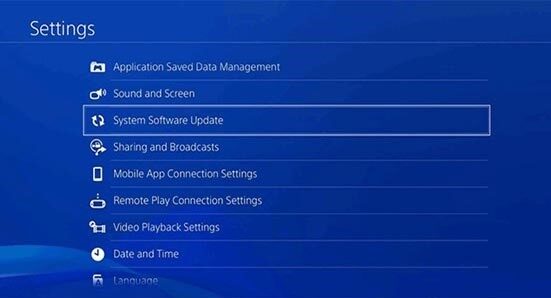
Step 1: Connect your PS4 console to the Internet and navigate to PS4 Settings > System Software Update.

PS4 Keeps Crashing

Step 2: If there are any available updates, click Update.

Tip: If you see the “The latest version of the system software is already installed” message, skip the steps below.

Step 3: Wait for the finish of the downloading. After the downloading process ends, move to Notifications > Downloads. Click on the newly-downloaded PS4 firmware and then follow the pop-up instruction to finish the operation.

Step 4: Now, open and play the game to see if PS4 works normally.

Fix 5: Restore Software to Default

Last but not least, you can restore software to default to fix the PS4 crashing issue. Here’s what to do.

Step 1: Press the Power button to turn off the console.

Tip: To make sure that the operation succeeds, you are recommended to unplug the power cable after turning off the console.

Step 2: Wait for about 1 minute and plug back the power cable. Then press and hold the Power button until you hear two beeps.

Step 3: Connect the DualShock controller to the console via a USB cable and press on the PS button.

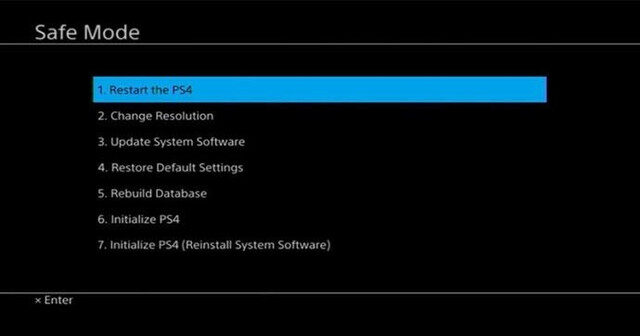
Step 4: After entering the Safe Mode, choose the Restore Default Settings option. Then follow the elevated instruction to finish the operation.

PS4 Keeps Crashing

To sum up, this post illustrates you 5 PS4 crashing fixes. If your PS4 keeps crashing, you can try them to fix it.

ASUS Laptop Price List in Kenya 2021

What are the ASUS laptops available in Kenya and their prices?

Asus laptops, are mostly know for their battery-saving capabilities.

In addition, these machines, usually, have very good build quality. With brushed aluminum finish or textures plastic.

This article, contains all ASUS laptops that are available in Nairobi, Mombasa, Kisumu and all other major towns in Kenya.

Also read: HP cheap laptops price list or Acer Aspire  laptops in Kenya.

All the laptops stated here are either available at Tushop Online – TUXEVO or Kilimall to ensure convenience and trust.So, below are Asus laptops price list in Kenya.

ASUS laptop price list in Kenya at <a href=Tushop Online – TUXEVO” width=”450″ height=”326″ title=”asus-x540sa-laptop-in-kenya”>

Who this laptop is appropriate for; the device can be suitable for student and average people. You can be able to run a few games here and there, but don’t expect to run the latest titles.
However, it will comfortably run everyday applications such as office suites and web browsing programs

Price: Kshs 29,000.

VIEW JUMIA OFFER

dealers of ASUS laptops in Kenya

Normal Price: Kshs 45,000

VIEW DEAL AT JUMIA

Best laptop deals in Kenya

Normal price: Kshs 29,000

SEE DEAL AT JUMIA

Normal price: Kshs 60,000

Tushop Online BEST OFFER

Asus service center in Nairobi Kenya

ASUS is a Taiwanese manufacture that makes electronics ranging from mobile phones, monitors, laptops, desktops to even tablets.

Though worldwide, ASUS is the 4th largest manufacturer, here in Kenya they have very little market share.

I think this is due to the fact that they have not done their marketing well. Because, if you compare its laptops with other, they are usually ahead of the rest when if comes to features – price comparison.

The company slogan is “in search of incredible”.

Though, not all these ASUS laptops have reached Nairobi yet. As sure, in the near future, we will see more laptops in the country as they get more exposed. It’s just like Lenovo, very few people knew about it until they made significant marketing moves.

However, my concern is that, we don’t have any ASUS mini laptops in Kenya. this would have appealed to a niche of people who prefer the smaller laptops to the bulky ones currently in existence.

If your ASUS product breaks down. Find the ASUS service center at School Lane Westlands next to Sun Africa Hotel. Telephone Number: 254 728606427

Further Reading

Asus ROG Phone 5 Ultimate Smartphone: 6.78″ inch – 18GB RAM – 512GB ROM – 64MP+13MP+5MP Triple Camera – 5G – 6000 mAh Battery
Asus ROG Phone 5 Pro Smartphone: 6.78″ inch – 16GB RAM – 512GB ROM – 64MP+13MP+5MP Triple Camera – 5G – 6000 mAh Battery
Asus VivoBook 15 F512 Laptop: 15.6″ inch – Core i3 – 4GB RAM – 256GB Internal Storage
Asus X509J Laptop: 15.6″ inch – Core i7 – 8GB RAM – 1TB Internal Storage
Asus X543N Laptop: 15.6″ inch – Intel Celeron – 4GB RAM – 1TB Internal Storage
Asus ROG Phone 5 Smartphone: 6.78″ inch – 12GB RAM – 256GB ROM – 64MP+13MP+5MP Triple Camera – 5G – 6000 mAh Battery
Asus Zen Aio (ZN220IC) All-In-One Desktop: 21.5″ inch – Intel Core i3 – 4GB RAM – 1TB ROM
Asus Zenbook UX571G Core i5 9th Gen 8GB 1TB + 4GB Nvidia Win 10
Asus UX409 Core i5 8th Gen 4GB 1TB + 2GB Nvidia
Asus UX409 Core i5 8th Gen 8GB 1TB Win10
Asus x543 Celeron 4GB 1TB Windows 10 15.6″
Asus x509 Core i3, 4GB 1TB Win 10
Asus Zenfone 7 Pro (ZS671KS) Smartphone: 6.67″ Inch – 12GB RAM – 256GB ROM – 64MP+8MP+12MP Triple Camera – 5G – 5000 mAh Battery