
Technology

Hostitbro hosting Review Problems and unprofessional Support

hostitbro

Hostitbro Hosting company is really a very unprofessional company in terms of technical knowledge and support.
It seems like Mr. Arsh Arora CEO and Founder of Hostitbro started a web hosting business by watching youtube videos. CEO/founder Arsh Arora Posted many fake posts everywhere on the internet to make it famous. From starting till now no smooth hosting with them.

Hostitbro Hosting


Hostitbro offers WordPress optimized Hosting.
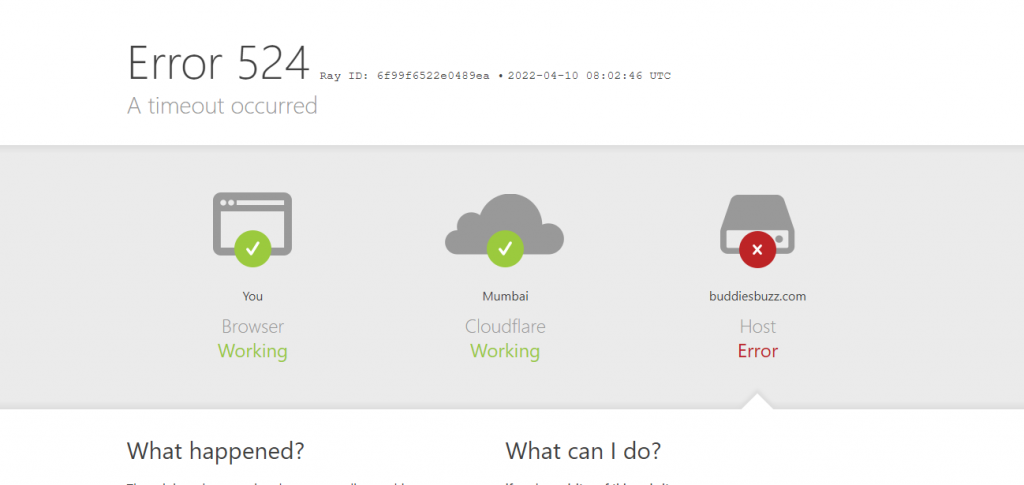
But in real Hostingbri hosting doesn’t support many WordPress plugins Server resources are always overloaded, the disk space issue, connectivity problems, server timeout frequent Host busy error or Host down the error., error 524 and Error 521. All these are common frequent problems you can face with Hostitbro Hosting. For Error 521 they blame Cloudflare even though they dont know error 521 comes due to the host firewall as the host is refusing the connection with Cloudflare IP.. For error 524 also blame Cloudflare. Even they dont Error 524 comes due to the server being busy or overloaded.

Hostingbro Unprofessional Tech Staff


The Main Problem with Hostitbro s Techsupport staff’s attitude.

Maybe the technical staff lacks knowledge or maybe he just trying to pass the time.

Tech support staff is never ready to accept the problem.

Tech staff Always passes the problem to others. Sometimes he says he doesn’t know how to do so please guide the steps. The tech support guy is always in hurry to close the ticket.
If you call on Hostifbro Support Phone they never picked calls and asked to open a ticket, when the message on Hostitbro WhatsApp you will get a reply that this is for accounts not for support,
If like that why did they give the phone number for support?

For the last three months, I am reporting issues. about CSS generation errors due to not being able to get visitors’ IPs.
Problem with their server software installation or firewall.
Before they made the excuse that lite speed doesn’t support this function. after that I showed old logs of their own server with the same function and also prove to them it is their server or firewall problem, installing the Litespeed on another server shows the same plugins working. But they are just passing the time still no solution.

I asked them many times to contact HETZNER as Hostitbro hosting on HETZNER VPS/Server. But no response.

Hostitbro company needs to learn one point service industry run by providing good service. You cannot run a hosting company by watching youtube videos or by posting fake reviews or blogs everywhere. Think before buying Hosting with them. As Arsh Arora posted many fake reviews by himself. But on the Hostitbro FB page, they closed the comments and review option so that users were not able to post any bad reviews about them.


The Best File Sharing Solution for Your Business

It’s understandable that you want to share files with your employees, contractors, and vendors. But, whether it’s due to outdated equipment or security concerns the process can be complicated. It can also be frustrating when you can’t access the file because of compatibility issues. Even worse is when the file is corrupt or inaccessible for other reasons. Wouldn’t it be great if there was a way to share files easily and securely? Well, there is! Meet Sharefile – a leader in secure file sharing – and find out how they can help your business today!

The Importance of File Sharing
File sharing is a critical component of any business. Whether it’s a file containing a document, a spreadsheet, or other important information, you need to be able to share files with your employees and other stakeholders.

However, the process of sharing files can be complicated. It can be cumbersome to send an email with large attachments. It can also be frustrating when someone doesn’t have access to an outdated piece of software or hardware that can open up your file.

Sharefile is a secure online file-sharing service that makes it easier for you to share files. Here are just some of the benefits Sharefile has to offer:

Sharefile: The Ultimate File Sharing Solution
Every business needs a reliable and efficient way to share files. Sharefile is the answer.

Sharefile makes it easy to share and collaborate on files with anyone you want, at any time, and from anywhere. It’s an affordable and secure solution that doesn’t require downloading or installing any software on your computer.

Sharefile also offers security features that many other file-sharing apps don’t offer. This is important for businesses as they often store sensitive information in files that they need to protect. Sharefile encrypts data during transfer, has a secure SSL connection, is ISO 27001 certified, and offers 256-bit AES encryption with two-factor authentication for logins.

The best part? You can use Sharefile for free during the trial period!

Sharefile’s Value for Your Business
Sharefile is a cloud-based tool that lets you securely share files with people in your organization or outside of your company. You can also access these files anytime, anywhere.

The great thing about Sharefile is that it offers protection for the information you share. Files are encrypted, and unauthorized parties can’t view them. Sharefile also uses authentication so only the people who are supposed to have access to the file have it.

Using Sharefile will give your employees an easy way to collaborate on projects without worrying about compatibility or security issues. It will also give you peace of mind knowing you’ll be able to access files easily when needed.

Why Choose Sharefile?
Sharefile is a secure, online file-sharing service that offers an easy way to share files between you and your team. You can use it to securely upload, store, and distribute files up to 5TB in size. Sharefile also integrates with countless applications so you can be sure your team will have access no matter what device they are using.

Sharefile is perfect for any business that needs to share large amounts of data securely. You can upload documents, presentations, or videos from your desktop or mobile device through the app on iOS or Android devices. Share information on projects with the people who need the information most!

If you’re ready for a change in how you share files, give Sharefile a try today!

How to Get Started with Sharefile
Sharefile is a secure cloud-based file sharing service that allows you to send and receive files in one central location. It’s the perfect solution for your business, whether you’re looking to share files with employees, contractors, or vendors.

To get started, you simply need to install the app on your phone or computer. Next, if you want to create an account, just enter your email address and set up a password. From there, it could not be easier! You can send attachments securely to anyone in your Sharefile account without sending them an email. All they need is their email address and password.

There are also advanced features like protecting files with passwords and setting expiration dates for documents. The best part? You can sync Sharefile across all of your devices so that all of your team members have access anytime they need it!

Conclusion
The best file-sharing solution is one that can handle all of your company’s needs without breaking the bank.

Sharefile is the ultimate file-sharing solution for both individuals and businesses. It’s an all-in-one solution that’s perfect for handling all of your needs from document sharing to video sharing. Sharefile is also easy to use and incredibly affordable for an all-in-one solution.

Get started with Sharefile by downloading the app on your computer, tablet or phone and you’ll be up and running in a few minutes. It’s a quick and easy process to upload or download any type of file from one device to another. ShareFile is also a great solution for businesses of any size—big or small—as the cost is based on how many files you need to share, not on who you share them with.

WHAT IS THE REFRESH RATE OF AN LED SCREEN

There are many giant SMD Screens solutions on the market. If in appearance they may seem similar and have the same function: to broadcast multimedia content and promotional messages in a giant format. Some nuances make the difference between an entry-level screen and a quality screen.

These technical characteristics can help you guide your choice according to your budget. We have also previously presented the notions of pitch,  power consumption, SMD Screens, and luminosity. We will now address a less often mentioned and yet equally important point, the notion of refresh rate. It will directly impact image quality and visual comfort concerning what is displayed.

THE REFRESH RATE OF A SCREEN

The refresh rate, also called refresh rate, corresponds to the number of scans performed by the screen in one second. That is the number of updates of images/information displayed per second. It is expressed in Hertz.  The higher the frequency, the more visual comfort, and a smoother image it will offer.

This refresh rate is therefore directly linked to the notion of image per second or FPS (Frame per second). The refresh rate applies to the screen and the FPS to a video. In addition, the refresh rate is generally higher than the FPS and will therefore include a reprint of certain identical images to complete the second.

THE REFRESH RATE, FROM A TECHNICAL POINT OF VIEW

As mentioned above, a high refresh rate is synonymous with screen quality. For a screen to be able to display images at such a frequency, there must be sufficient connections to transmit more data at the same time. Similarly, a suitable processor is needed to process this information quickly. Finally, you also need a good storage system to manage all these images. So the ability of LEDs to display light intensity variations at a high frequency is not enough on its own. The entire screen must be able to handle a high refresh rate.

Nowadays, there is a simple test to observe the refresh rate level of a screen. To do this, simply view it with the photo/video mode of a smartphone. Indeed, current phones generally have a recording rate of 30/60 FPS in 4K.

They can even go up to 240 Fps or even 960 Fps for slow-motion video. So if the screen image displayed on the phone appears crisp, then its refresh rate is greater than or equal to your phone’s recording rate. On the other hand, if you have fixed black bands where moving appears, it is because it is lower.

The ROA: return to attention and the notion of interaction

Indeed in some cases, the move to action, the realization of a sale is not necessarily immediate. However, it is important to value the first contact and capture the prospect’s attention. The ROA makes it possible to measure the notion of the popularity of a brand or a campaign, and its ability to attract the attention of consumers. It also integrates that interactivity thanks to the multiplication of multimedia tools and the connected dimension.